PID制御器のシミュレーション
· 9 min read

制御対象
4次の伝達関数で表される制御対象を考える:
状態空間表現への変換
num = [0 0 12 8];
den = [20 113 147 62 8];
sysg = tf(num, den);                    % 伝達関数
[Ao,Bo,Co,Do] = tf2ss(num,den);        % 状態空間表現への変換
PID制御器
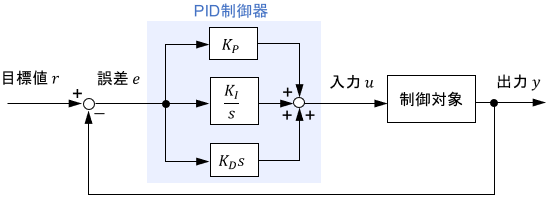
離散時間での表現():
偏差の定義
偏差 = 目標値 - 一個前の制御量
PID制御器伝達関数
gamma = 4*T;  % γ(微分項のフィルタ時定数)
cp = 6;       % 比例ゲイン
ci = 1;       % 積分ゲイン
cd = 7;       % 微分ゲイン
数値積分手法による離散化
1. 前進差分
PID制御器のZ変換表現
P-I-D分解実装(推奨方法)
比例制御(P):
積分制御(I):
積分制御の意味
偏差の累積で制御する
微分制御(D):
微分制御の意味
偏差の変化で制御するつもりだが、初期状態には変化がない。微分の × ローパスフィルタ
状態空間表現(前進差分)
2. 後退差分
PID制御器のZ変換表現
P-I-D分解実装
比例制御(P):
積分制御(I):
微分制御(D):
状態空間表現(後退差分)
3. 双一次変換法
PID制御器のZ変換表現
P-I-D分解実装
比例制御(P):
積分制御(I):
微分制御(D):
状態空間表現(双一次変換)
MATLABシミュレーションコード
プログラミング上の注意点
行列計算の注意事項
行列計算する時、行列の次元に注意
inv()  % 逆行列
eye()  % 単位行列I
./     % 行列除算
.*     % 行列要素ごとの乗算
最も注意すべきなのは、括弧と正負の符号である。理由は、コードの数式が読みづらい。
解決策:
- コードをLaTeX公式に入れて、確認する
- 目と手でもう一回計算して確認する
制御ループの実装
for k=1:N+1
    y(k) = C*x(k) + D*u(k)     % 出力計算
    e(k) = r(k) - y(k)         % 偏差計算

    % 離散方法
    up(k) = ...                % 比例制御
    ui(k) = ...                % 積分制御
    ud(k) = ...                % 微分制御
    u(k) = up(k) + ui(k) + ud(k)

    % 前進差分で状態更新
    x(k+1) = x(k) + T*(A*x(k) + B*u(k))
end
制御順序の重要性
- 実際の場合、センサからの観測値をもらうので、が先の方である
- しかし、を先にすると、におけるがずっと0で計算している。普通になので影響がない
- また、現在の入力を求めたい。を求めるために、現在の出力(観察値)が必要である。出力を得るために、現在まだ求めていない入力を使うべきではない
完全なシミュレーションコード
PID制御器比較
clear
close all
set(0,'DefaultAxesFontName','Times New Roman')
set(0,'DefaultAxesFontSize',22)

%--------------------------------------------------------------------
%  同定ゼミ宿題 PID制御器のシミュレーション
%                                                5/26 by YANG
%---------------------------------------------------------------------

Tmax = 30;    % シミュレーション時間
T = 0.05;     % サンプリング周期
n = Tmax/T;   % サンプル数
gamma = 4*T;  % フィルタ時定数

% PIDパラメータ
cp = 6;       % 比例ゲイン
ci = 1;       % 積分ゲイン
cd = 7;       % 微分ゲイン

% 制御対象
num = [0 0 12 8];
den = [20 113 147 62 8];
sysg = tf(num, den);
[Ao,Bo,Co,Do] = tf2ss(num,den);

% 配列初期化
t = zeros(1, n+1);
r = ones(1, n+1);      % 目標値(ステップ入力)

% 前進差分用配列
upF = zeros(1, n+1);   % P制御入力
uiF = zeros(1, n+1);   % I制御入力
udF = zeros(1, n+1);   % D制御入力
uF = zeros(1, n+1);    % 総制御入力
xF = zeros(4, n+1);    % 状態変数
yF = zeros(1, n+1);    % 出力
eF = zeros(1, n+1);    % 偏差

% 前進差分によるPID制御
for k = 2:n+1
    t(k) = (k-1)*T;
    yF(k) = Co*xF(:,k) + Do*uF(k);
    eF(k) = r(k) - yF(k);

    % PID制御計算
    upF(k) = cp*eF(k);
    uiF(k) = uiF(k-1) + ci*T*eF(k-1);
    udF(k) = (cd*(eF(k)-eF(k-1)) - (T-gamma)*udF(k-1))/gamma;
    uF(k) = upF(k) + uiF(k) + udF(k);

    % 状態更新
    xF(:,k+1) = xF(:,k) + T*(Ao*xF(:,k) + Bo*uF(k));
end

% 他の手法(後退差分、双一次変換)も同様に実装...
P-I-D個別効果比較
% P, I, D制御の個別効果を比較するシミュレーション
for k = 2:n+1
    t(k) = (k-1)*T;

    % P制御のみ
    ypF(k) = Co*xpF(:,k) + Do*up(k);
    epF(k) = r(k) - ypF(k);
    up(k) = cp*epF(k);
    xpF(:,k+1) = xpF(:,k) + T*(Ao*xpF(:,k) + Bo*up(k));

    % I制御のみ
    yiF(k) = Co*xiF(:,k) + Do*ui(k);
    eiF(k) = r(k) - yiF(k);
    ui(k) = ui(k-1) + ci*T*eiF(k-1);
    xiF(:,k+1) = xiF(:,k) + T*(Ao*xiF(:,k) + Bo*ui(k));

    % D制御のみ
    ydF(k) = Co*xdF(:,k) + Do*ud(k);
    edF(k) = r(k) - ydF(k);
    ud(k) = (cd*(edF(k)-edF(k-1)) - (T-gamma)*ud(k-1))/gamma;
    xdF(:,k+1) = xdF(:,k) + T*(Ao*xdF(:,k) + Bo*ud(k));
end
結果可視化
% 制御入力の比較
subplot(2,1,1);
plot(t,uF,t,uB,t,uD);
title('制御入力 u(t)');
legend('前進差分','後退差分','双一次変換');
ylabel('u(t)');
xlabel('Time[sec]');
grid on

% 出力応答の比較
subplot(2,1,2);
plot(t,yF,t,yB,t,yD,t,r,'--');
title('目標値r(t)と出力y(t)');
legend('前進差分','後退差分','双一次変換','目標値');
ylabel('y(t)');
xlabel('Time[sec]');
grid on
性能比較と考察
各手法の特性
| 手法 | 安定性 | 精度 | 計算負荷 | 実装容易さ |
|---|---|---|---|---|
| 前進差分 | 条件付き | 低 | 低 | 高 |
| 後退差分 | 良好 | 中 | 中 | 中 |
| 双一次変換 | 優秀 | 高 | 中 | 中 |
PID制御の各要素の役割
P制御(比例制御)
- 効果: 偏差に比例した制御
- 特徴: 応答速度の向上、定常偏差の残存
- 調整: ゲインを大きくすると応答が速くなるが、振動しやすくなる
I制御(積分制御)
- 効果: 偏差の累積を解消
- 特徴: 定常偏差の除去、応答の遅れ
- 調整: ゲインを大きくすると定常偏差は早く除去されるが、オーバーシュートが増加
D制御(微分制御)
- 効果: 偏差の変化率に基づく制御
- 特徴: 応答の改善、雑音の増幅
- 調整: ゲインを大きくすると安定性は向上するが、雑音に敏感になる
実装上のポイント
- ゼロオーダーホールドの適用: 因果関係の保持
- フォント設定: 可読性の向上
- 軸ラベルと単位: グラフの明確化
- 初期値設定: 適切な初期条件の設定
まとめ
本シミュレーションでは:
- 離散化手法: 3つの数値積分手法による比較
- PID制御: 各制御要素の個別効果と統合効果
- 実装技法: MATLABによる効率的なプログラミング手法
- 性能評価: 安定性、精度、実用性の観点からの評価
これらの知識は、実際の制御系設計における重要な基盤となる。特に、離散化手法の選択は制御性能に大きく影響するため、システムの特性と要求性能に応じた適切な選択が重要である。


